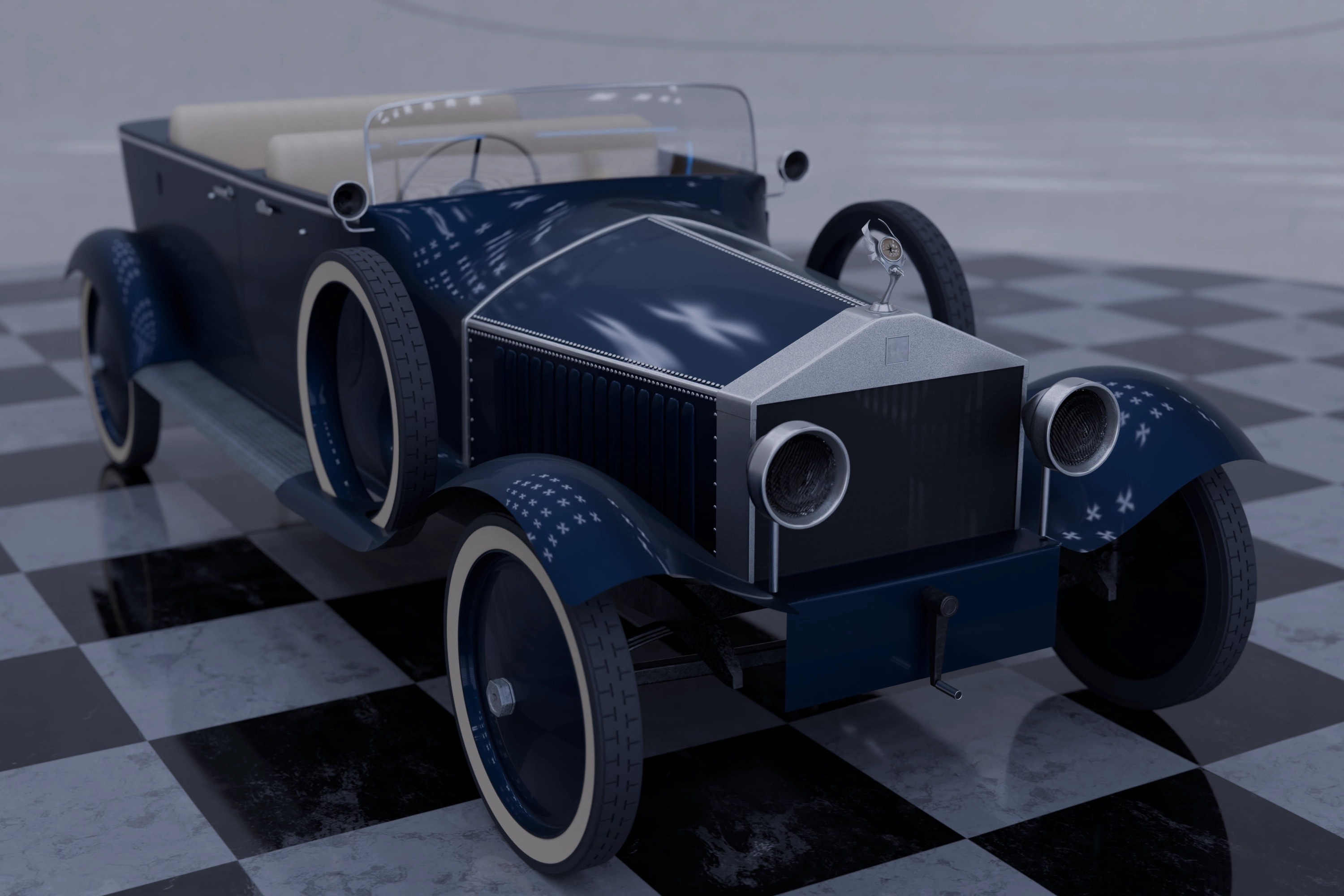
I made my first game-ready asset a while back, and I have to say, these things are a lot more complex than I thought. The scale and complexity of it all sneaks up on you. One minute, I'm living my happy-go-lucky life in modeling lala land; the next, I'm haggling. Of course, this speaks to my naivety as a 3D artist, but I wasn’t fazed when I saw a challenge on ArtStation for game asset development. Like the moth I am, I chose my trial by fire: a 1919 Rolls-Royce Silver Ghost. The challenge specifications asked for something from before 1920 with an antique feel, and the choice couldn’t have been more obvious. I would soon learn that my choice was not aligned with what the challenge organizers had asked for, and later that the coat I coveted was way bigger than the cloth had.
Still, it had been on my bucket list to model something as multifaceted as a car and, by all appearances, my opportunity was here. Now we can talk about the game asset development pipeline, but I am a little too short in the tooth as a 3D Artist to teach, so I'll talk about the misadventures of my childlike wander.
Scale
Modeling and Sculpting were my favorite parts of this project. 10-year-old me was back in art club, making collages only; instead of leaves, sand, and glue, I had Blender and a hunger for good topology. The model I chose had curves, hard edges, and flat surfaces, all of which had to meld into one object. This was a Zen exercise which afforded me a luxury only an uninformed optimist can appreciate. I eventually hit the fork in the road that separates game animation from almost all other forms of 3D work: retopology. The objective was to create a game-ready asset with only 25k tris (12.5k quads). This meant that the few dozen million tris my time in artistic therapy had accrued had to be cut by a factor of 2000. That's when I started to haggle with myself.
Modeling & Retopology
Modeling and Sculpting were my favorite parts of this project. 10-year-old me was back in art club, making collages only; instead of leaves, sand, and glue, I had Blender and a hunger for good topology. The model I chose had curves, hard edges, and flat surfaces, all of which had to meld into one object. This was a Zen exercise which afforded me a luxury only an uninformed optimist can appreciate. I eventually hit the fork in the road that separates game animation from almost all other forms of 3D work: retopology. The challenge was to create a game-ready asset with only 25k tris, which meant my time in artistic meditation had accrued a few dozen million tris that the task demanded I abscond with.
The curves my model holds define its stance and personality. It’s a classic luxury car from the 1910s, after all; designers of that era needed fenders. Cars had to have these bulbous, voluminous mudguards. The trick at this stage was finding interesting ways to maintain my model’s silhouette while staying under budget. By the time I was down to the last few tris, I had to drop half the little details I had modeled during the first phase of my build. Needless to say, I managed 25,000 tris right on the dot. However, I later threw caution to the wind on the budgeting front, exercised some artistic belligerence, and wound up at 26,614 tris.
Unwrapping
Unwrapping was a breeze on my first try. You see, texturing my models has never had to really account for game engine specifications. In fact, I’ve found that having as many maps as possible per object yields the best results. However, I'd heard the legend of stacking my UV islands, so areas that needed more detail to stand out would actually benefit. I hadn’t put this into practice until now because, when creating renders for marketing or animation, the limit is your self-determined system, not external constraints. I managed to create a wonderful map with all the bells and whistles, then baked the most pixelated textures I’ve ever had on any model. Turns out my informed pessimism hadn’t met the valley of despair; and to preface this stage, the valley was large.
Texel Density
Now, my beauty renders for the model were done in Blender’s Cycles, with fancy volumetric and a lot of post-rendering compositing. The goal was to have the cleanest renders for this blog. So, when I did my first render, I was, at the very least, impressed with myself. I mean, in my not-so-humble opinion, these were the cleanest renders I had done yet. But like any new venture, I had to brace for unfortunate twists and sudden turns. I came upon a new term, texel density. A principle that determines how crisp my live renders turn out when I got to the engines. With a model as large as a car, the idea that a single UV map would suffice flew right out the window. I also learned that curvature, normal, and ambient occlusion maps were not magic wands. Even the uninitiated eye could catch a poor low-poly model.
The Atlas
So I retopologized my mesh a second time, optimized UV islands for stacking, split the model into four distinct meshes (each with its own map), and implemented the UDIM workflow. To the best of my understanding, UDIMS are tiled UV maps. You can tile multiple maps so the overall texel density and resulting texture resolution hold up under scrutiny. I figured it out and finally managed clean bakes. Nothing like the high-poly beauty renders, but alas, the game asset pipeline up to this point wasn’t so foggy.
Texturing and Baking
My Blender-based texturing workflow is pretty standard; we have both procedural and PBR-based workflows throughout the model. The patina that forms around aged metal objects, for instance, is procedural, while the diamond stepping plate was a PBR texture. Still, baking all these materials onto one map required some finesse. My first thought was to export my low-poly model with material IDs into a free texturing software like Quixel Mixer. I, however, found out that the emotional cycle of change came full circle, with uninformed optimism ending after installation, informed pessimism following me soon after I launched the application, and a deeper valley of despair than the one I was currently in, inviting me into the false bottom that had been the final stage in a prolonged learning curve.
A few rants from my end: Texturing software, while crucial, is way too expensive for learners; the open-source versions of these applications don't meet industry standards, raising the barrier to entry for aspiring professional digital artists; and, finally, the learning curve for each piece of software can be very intimidating.
I spent a few days climbing into my new "valley of despair" by trying out Quixel, InstaMat, and ArmorPaint. Eventually I made the sane choice, tried informed optimism for a change, and figured out how to bake these maps in Blender. I’d had enough and wanted to bring this hapless misadventure to an unnatural, anticlimactic conclusion. So, I did my thing, and here we are: a game-ready asset, even though it looks more like a B-tier indie game than the AAA asset I was going for. The asset has no rig or animations, but it’s a valiant first attempt.
Success and Fulfillment
At the end of the emotional cycle of change comes success and fulfillment, often the consequence of a journey well traveled. I find myself unfulfilled and with a sense of accomplishment that is muted at best. But just as I was ready to pack up my intellectual bags and retreat into the familiar territory of traditional animation and 3D marketing, I stumbled upon a new challenge. It requires me to retrace my steps and apply my knowledge to develop a new asset.
The emotional rollercoaster of my virgin attempt is all but gone. So, for this build, I will use the four stages of competence as my road map. I like to think I’m not starting from zero, so here’s a link to the live page; this time, the floor is Conscious Incompetence.